Weather watch face W6.5
- 4.3
- Rating
- 10.00K
- Installs
- $2.99
- Price
 Analysis by App-foxy
I approached Weather watch face W6.5 as a small, practical weather tool rather than a full forecasting app. Its job is to put weather information on the front of a compatible Wear OS watch, so the useful question is not whether it replaces a detailed forecast service, but whether it helps you understand the conditions quickly without opening your phone. After spending time with it, I think that distinction matters. This is a glance-first experience, designed for people who want their watch face and weather information to work together.
It comes from Futorum and is listed as a weather app for Wear OS 5 and newer. The app costs $2.99, carries an Everyone age rating, and uses the short store name Weather watch face W6.5. Its current release is version 1.0.0, so I would approach it as a focused watch-face purchase rather than a large, mature weather platform with a wide collection of tools.
What to expect from this weather watch face
The first thing to understand is the format. W6.5 is not the sort of app I would install on a phone expecting maps, radar layers, long written forecasts, or a complete weather dashboard. It is a watch face, which means its value appears during those tiny moments when you raise your wrist: before leaving home, while deciding whether to walk, or when checking conditions between meetings.
You May Also Like

 Pandora - Music & Podcasts
Pandora’s Music Is Easy to Start, but Harder to Recover
Pandora’s strength is its low-effort path from a seed to a station. Its weak spot is how much confidence it asks you to place in connection, setup, and quiet recovery.

 8 Ball Pool
 Is Built on Rivalries, Rematches, and Routine
A close look at the rivalries, rematches, shared routines, and unanswered safety questions that turn a quick pool match into a persistent mobile community.

 Samsung Music
’s Quiet Strength Is Playing What You Already Own
Its reach comes less from spectacle than from dependable access to a personal library. That simplicity is both the app’s strongest retention engine and its ceiling.

 AccuWeather: Weather Radar
AccuWeather Review: A Quick, Clear Forecast for Everyday Decisions
For everyday plans, the best forecast is the one you can understand quickly. AccuWeather makes rain timing, radar, and local conditions easy to act on, with a few trade-offs.

 Hill Climb Racing
Why Hill Climb Racing Still Turns Crashes Into One More Run
A tiny car, a bumpy hill and one more upgrade: Hill Climb Racing keeps resurfacing because its simple chaos makes every near-miss feel personal.

 AliExpress - Shopping App
AliExpress Makes Global Shopping Feel Personal, but Shoppers Bear the Risk
AliExpress turns a global marketplace into a pocket-sized discovery engine. Its reach is useful, its shopping loop compelling, and its trade-offs easy to miss.
More From Our News Desk
View All News


That narrow purpose is also its main strength. A conventional weather app often asks you to unlock your phone, find the right icon, wait for the screen to load, and interpret several panels. A dedicated weather watch face can reduce that routine to a glance. For a first-time user, that makes the product easy to understand: install it on a supported watch, select it as the active face, and use the information displayed there as a quick prompt for your next decision.
I would not choose it as my only source for severe-weather planning or detailed travel preparation. When I need an hourly breakdown, location searching, precipitation timing, or a broader forecast context, a regular weather app remains the better tool. W6.5 makes more sense beside that kind of app, not necessarily instead of it.
The app has an average rating of 4.3 from around 286 ratings, with 19 written reviews and over 10K installs. Those figures suggest a modest but real user base rather than a completely unknown experiment. They do not change the basic trade-off, though: you are paying for a watch-face format that prioritizes immediate visibility over deep interaction.
Who will get the most from it
I see the strongest fit for someone who already wears a compatible Wear OS watch throughout the day and checks the time frequently. If you commute on foot, cycle casually, walk a dog, work outdoors, or simply dislike pulling out your phone for every small question, the weather-focused layout can become part of your routine.
It is also a sensible choice for people who prefer a calmer watch face. Instead of treating weather as a separate destination, W6.5 makes it part of the watch’s primary screen. That can be helpful when the decision is simple: jacket or no jacket, umbrella or no umbrella, outdoor break or indoor break.
I would be more cautious if your priority is customization, extensive complications, or a very detailed forecast. A general-purpose watch face with a weather complication may suit you better if you want to arrange several unrelated data points around your own design. Likewise, someone who rarely wears a watch will probably gain more from a conventional phone weather app.
Getting from installation to a useful first glance
I’d use this section to focus on the small steps that turn an installed face into a dependable part of my routine: checking compatibility, making it active, and trying it in the places where I normally glance at my watch. That first trial also helps me decide whether the information is easy to read without interrupting what I’m doing. From there, the next section looks at what a quick glance can—and cannot—settle.
Start with compatibility, not customization
Before buying, I would first confirm that the watch runs Wear OS 5 or a newer version. That is the most important practical checkpoint because this product is built around that platform requirement. If your watch does not meet it, the attractive design or low purchase price will not solve the compatibility problem.
Once installed, the next meaningful step is not to explore every setting immediately. I recommend selecting W6.5 as the active watch face and then wearing the watch normally for a few minutes. This gives you a better sense of whether the information is readable at the angles and distances you actually use. A watch face can look appealing in a store preview yet feel crowded or too subtle when viewed in motion.
For a first test, stand near a window or prepare to leave the house, glance at the face, and make one small decision based on what you see. That might be taking a light layer, postponing a short walk, or checking the phone only when the watch face leaves you needing more detail. The first successful action is not configuring everything; it is making one quicker weather decision without opening another app.
A practical morning routine
My preferred workflow would be simple. After getting dressed, I would check W6.5 before picking up the phone. If the conditions look suitable for the planned activity, I can leave immediately. If something looks questionable, I use the phone’s full weather app for confirmation. This two-stage approach keeps the watch face useful without asking it to do a job it was not designed to handle.
That workflow is especially helpful on rushed mornings. The watch face acts as a filter: it tells me whether the weather deserves further investigation. I do not need a complete forecast for every trip to the mailbox, but I do appreciate a quick warning that conditions may not match what I expected from the previous evening.
For commuting, the same idea works in reverse. I can glance at the watch before leaving work instead of remembering to check the phone earlier in the day. The benefit is less about discovering a dramatic new forecast and more about catching a change at the moment it affects my next action.
How to judge readability in real use
Spend time checking the face in both bright outdoor light and a dim indoor room. Weather information is only useful when you can identify it quickly. I would also test it while walking, because a design that is clear when stationary may require a longer glance than is comfortable when crossing a street or carrying bags.
Do not judge it solely by how much information appears on screen. A watch face that displays fewer details may be more useful if the important message is easy to recognize. Conversely, if you find yourself repeatedly opening your phone to interpret the watch, that is a sign that a more detailed complication or a standard weather app may be a better match.
Common confusion and the limits of a glance-first design
I’d cover the expectations that can make a specialized watch face feel confusing at first, especially the difference between noticing conditions and investigating a forecast. A useful habit is to treat the watch as a prompt: if the decision matters or feels uncertain, I switch to a fuller weather app rather than guessing from a compact display. That distinction keeps convenience from becoming misplaced confidence.
Why it does not replace a full forecast app
The most likely misunderstanding is expecting a weather watch face to behave like a complete forecasting service. W6.5 is best treated as a surface for quick awareness. It is not the format I would rely on when planning a hike, deciding whether to drive through changing conditions, or checking several future time periods before an event.
When the decision has consequences, I would still open a full weather app and look at the broader forecast. That is not a failure of W6.5; it is the natural limit of putting information on a small watch display. The watch face saves time for simple checks, while the phone remains better for investigation.
Why the first setup may feel less exciting than daily use
A watch face does not usually deliver a dramatic onboarding moment. After installation, the main result is that the watch looks and behaves differently. That can feel understated compared with installing an app full of menus and interactive screens. The payoff appears later, when the information is available exactly where you already look for the time.
Because of that, I would give the face a full day of normal use before deciding whether it is worthwhile. Notice how often you check the watch before reaching for the phone. Pay attention to whether the weather information actually changes your behavior. If it does, the small purchase begins to make sense; if you never look at it, no amount of visual polish will create value.
What to do when you need more certainty
Use W6.5 as the first question, not always the final answer. If the display suggests conditions that could affect a longer outing, switch to your usual detailed weather app. This is the most reliable way to avoid overinterpreting a compact watch-face presentation.
I also recommend keeping your expectations consistent with the app’s category. A weather app designed as a watch face is about reducing friction, not collecting every possible forecast detail. If you want notifications, location management, charts, or extensive forecast exploration, compare it with a dedicated weather application before purchasing. If you want the weather visible during ordinary watch checks, W6.5 is much more targeted.
Where it fits among the usual alternatives
The usual alternative is a standard watch face with a weather complication. That route may be better for someone who wants to choose a broad design first and add weather as one element among several. It can offer a more personalized balance between time, activity information, calendar details, and weather, depending on the watch and the available complications.
W6.5 is more appealing when weather deserves a central position. You are not treating conditions as a small accessory to another design; you are choosing a watch face built around that purpose. The trade-off is specialization. You may gain faster weather recognition while giving up some flexibility compared with a general face.
Another alternative is simply opening a weather app on the watch when needed. That gives you a more deliberate way to inspect conditions, but it adds steps. The advantage of W6.5 is that it moves the first glance out of the app drawer and onto the surface you already use. For frequent checks, that can be the difference between actually looking and postponing the check until it is too late.
Finally, a phone-only weather routine remains perfectly reasonable. It is likely better for users who do not wear their watch consistently or who need detailed forecasts more often than quick ones. The purchase makes sense only when the watch is already part of your daily habits.
My recommendation after using it as a daily tool
I would recommend Weather watch face W6.5 to a first-time Wear OS watch-face buyer who wants a straightforward weather-centered experience and has a compatible device. Futorum keeps the idea focused: put weather at the front of the watch, make the first check faster, and leave detailed planning to a fuller weather service when necessary.
The $2.99 price is reasonable if you will genuinely use that glance several times a day. It is less convincing if you are mainly shopping for decoration or expect a complete forecast platform on your wrist. The Everyone rating also makes it broadly approachable, but the real decision is about habits and screen priorities rather than age.
My advice is to begin with one routine, such as checking the face before leaving home each morning. After that, add a second situation where the information matters, like the trip home or an outdoor break. This gradual approach makes it easy to tell whether the watch face is helping or merely occupying the screen.
At version 1.0.0, I see W6.5 as a focused option rather than an all-purpose weather solution. Its best quality is convenience: the forecast becomes part of the ordinary act of checking the time. Its main limitation is the same specialization that gives it purpose. If you want a compact weather cue on a Wear OS 5 or newer watch, it is a sensible, paid choice. If you need deep forecasts, broad customization, or rarely wear a smartwatch, your usual weather app or a more flexible watch face will serve you better.
In my experience, the right way to judge it is not by asking whether it contains everything. Ask whether it helps you make one everyday weather decision faster. If the answer is yes, Weather watch face W6.5 earns its place on the watch.
FAQs for Weather watch face W6.5
01What is Weather watch face W6.5?
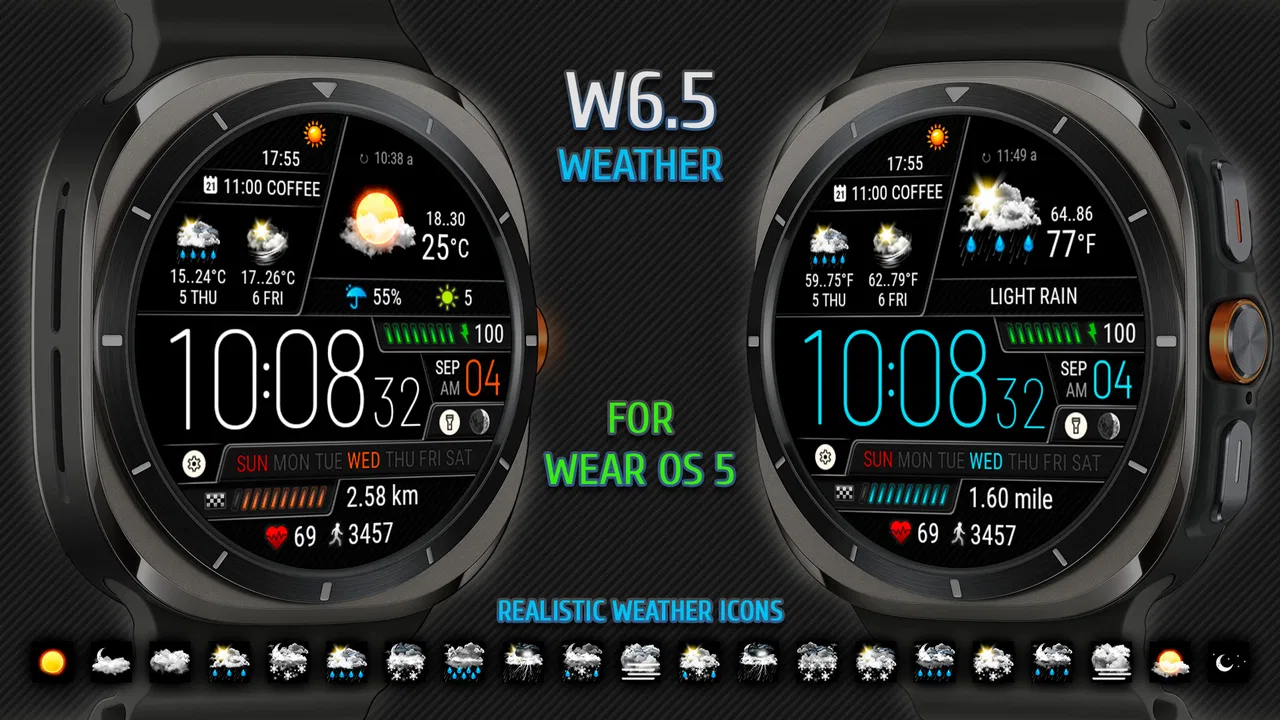
Weather watch face W6.5 is a customizable watch face designed for compatible Wear OS smartwatches. It focuses on presenting weather information, time, date, and other useful details directly on the watch display. Its appearance may vary depending on the selected settings, available complications, and the watch model, so users should confirm compatibility before downloading or purchasing it.
02Which smartwatches are compatible with Weather watch face W6.5?
Compatibility depends mainly on the operating system and the distribution platform. Weather watch face W6.5 is intended for supported Wear OS devices, but not every smartwatch offers the same installation or customization experience. Before installing, check the app listing for supported Wear OS versions, watch models, and phone requirements. Older devices may lack certain features or display options.
03What weather information does Weather watch face W6.5 display?
The watch face can show weather-related details such as current conditions, temperature, and forecast information, depending on the configuration and the weather provider available on your device. The accuracy and update frequency may be affected by location permissions, internet access, battery-saving settings, and the selected weather source. Some information may require enabling complications or changing the layout.
04Can Weather watch face W6.5 be customized?
Weather watch face W6.5 generally provides customization options for elements such as colors, layouts, displayed information, complications, and possibly background or indicator styles. The exact choices depend on the version installed and the capabilities of your smartwatch. After installation, open the watch-face customization menu in the Wear OS app or on the watch to review and adjust the available settings.
05Does Weather watch face W6.5 affect battery life or require permissions?
Like any active watch face, Weather watch face W6.5 may have a small effect on battery life, especially when it frequently refreshes weather data, uses location services, or includes animated and always-on elements. It may request permissions for location, notifications, or data access. Review these permissions carefully and disable unnecessary features if you want to reduce battery consumption.
Pros
- Clear weather details at a glance on compatible watches.
- Multiple data fields make the face highly informative.
- Stylish design suits both casual and outdoor use.
- Useful forecast information can reduce phone checking.
- Likely offers customization for personal watch layouts.
Cons
- May look crowded when many complications are enabled.
- Weather accuracy depends on the connected data provider.
- Some features may require a compatible smartwatch model.
- Could consume more battery than a simpler watch face.
- Setup may take time if several display options are available.

Weather watch face W6.5
Gallery